![]() |
How To Hack Wifi Using CMD– TecticalHapi
How to hack any WIFI’s password in command Prompt(CMD)…..
Hello Everyone,
Welcomes you in my Blog.
So Guys, In this post we going to learn that “How to Hack password of any WIFI?” or
“How to recover password of a wifi which is connected to your PC and you forget that?”
Also Read–What is Ransomware? How To Protect Yourself from Ransomwares.? Complete Study of RANSOMWARE.
So doing this task you have to do the following steps…
Follow me on Facebook
Click Here…
first of all, confirm that you are not connected to any network. If you connected then disconnect it.
Now follow the following steps—
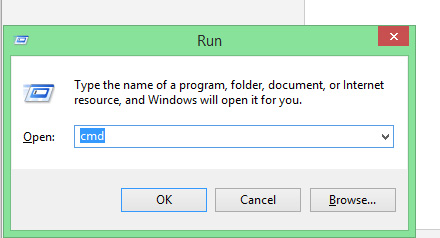
1.- Press win+R key and open run Box.

2.-In the ‘Run Box’ type “CMD” without quats and hit enter.
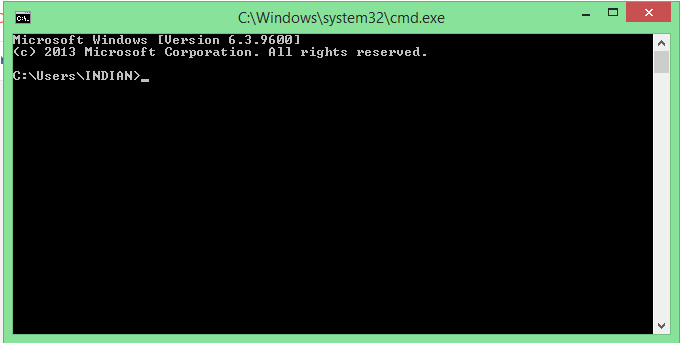
(After doing this Command Prompt will open on your System…)

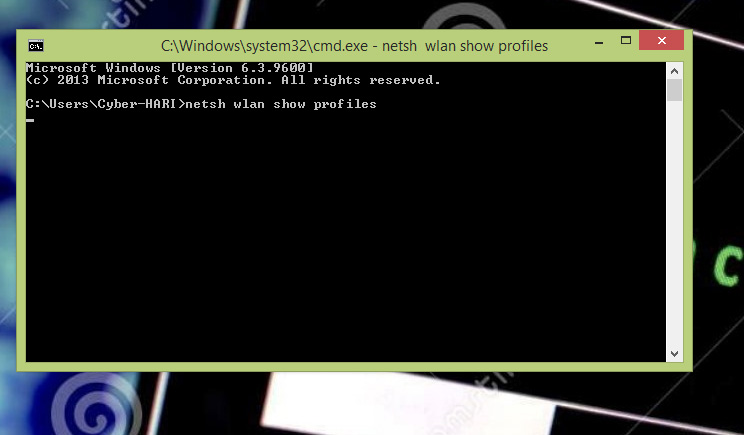
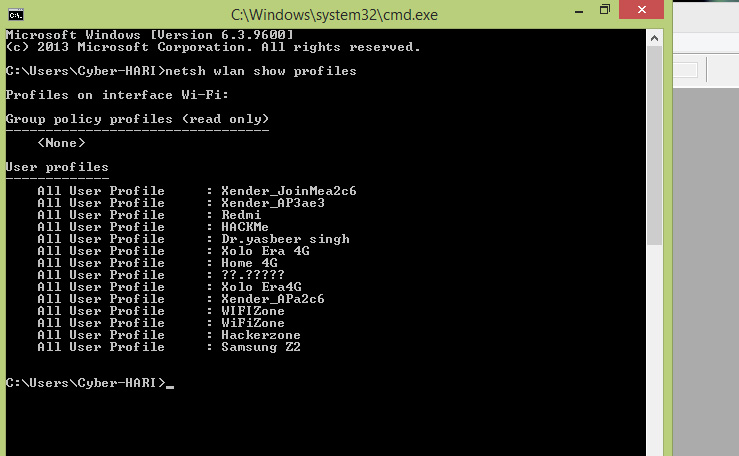
3.-Now type ‘netsh wlan show profiles’ without quats and press enter.

Must Visit– Tech tricks Click Here…
Technique World Click Here…
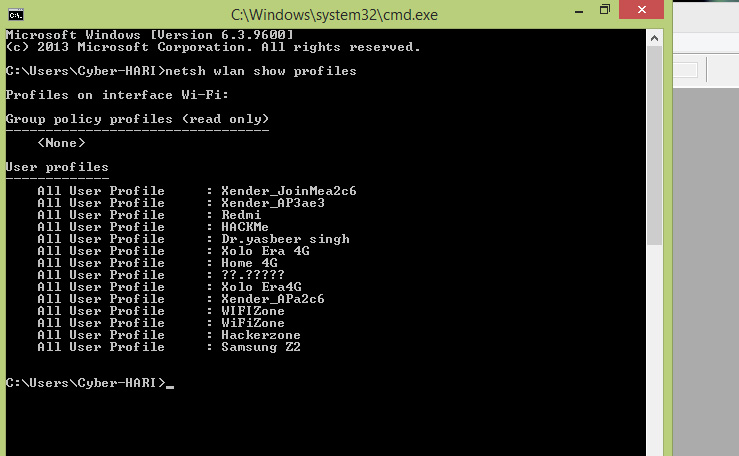
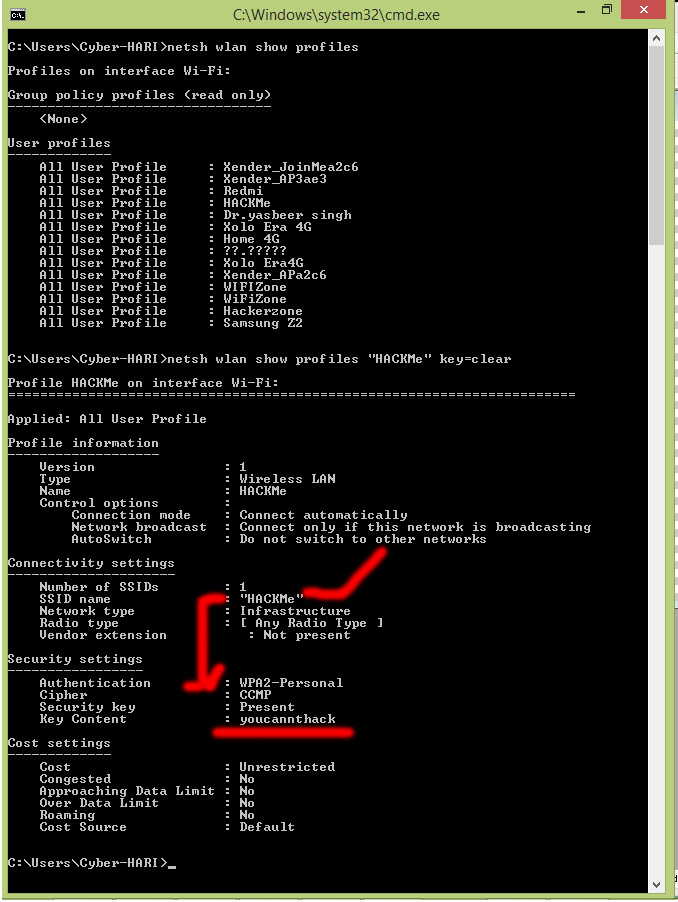
After doing this you’ll see a list of wifi networks, As shown in the image below…..

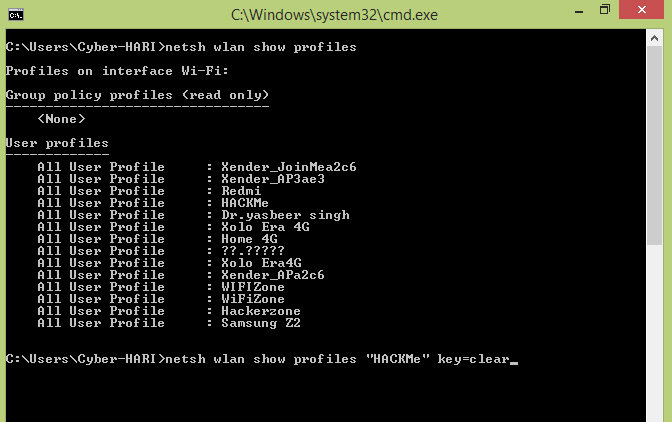
4.- Now type ‘netsh wlan show profile “profilename” key=clear’ and hit enter
(Note:- Profilename= WIFI network name e.g.’WorldWIFI’ or SSID of target wifi)

Follow me on Youtube Click Here…
After this, you see long list details about the chosen wifi as shown in below image…

Key content is the password of the hacked wifi.Put these keywords in security key as password and enjoy the free internet.
ALSO Read–What is UI.?Types of UI..?
Thanks for your regards!!
TAGS-
how to hack wifi, hack wifi in cmd, wifi hacking tools, cmd commands for hacking wifi, how to connect a wifi network without password,
What is ‘Blue whale’ Game.? Why Player commit suicide after playing this game.?– Tecticalhapi
What is ‘Blue whale’ Game.?
Why Player commit suicide after playing this game.?

‘Blue Whale’ is an internet game and it has spread in several countries.The game allegedly consists a series of 50 task with 50days.One task per day is provided to the player by the administrator during 50 days.The game like the Hollywood movie “Zathura-A space Adventure”, where 2 childern plays the game named–‘Zathura’.In the game, they have to complete the task, which was given by the game box.Like that, in “Blue Whale Game” the player have to complete all tasks, If he/she do not complete the task he will punish.The way of punishment the administrator responsibility.
Blue Whale Challenge is far from a game. Young teens who accept the challenge are encouraged to complete a series of tasks which get more and more sinister and at the end of the game the player is urged to take their own life in order to “win.”
Also Read–What is UI(User Interface).?Types of UI .?
Game summary–
“Blue Whale Game” began in Russia in 2013 with “F57”, one of the names of the so-called “Death Group” of the VKontakte social network.In Russia in 2016, Blue Whale came into broader use among teenagers after a journalist brought attention to it through an article that linked many unrelated suicide victims to the Blue Whale, creating a wave of moral panic in Russia.
The game based/working on the relationship between player and administrator. It involves a series of duties given by the administrators that players must complete, usually one per day, some of which involve self-mutilation. Some tasks can be given in advance, while others can be passed on by the administrators on that day, the last task is to jump from a high building.
If a player can not complete the all tasks or he/she wants to leave the game the administrator gives him/her online peer pressure on social site and public groups.
Click Here…To follow me on Youtube
How the administrator takes the player in own hand…
The transcript of their conversation with the administrator is below…
Player-I wants to play the game.
Administrator- Are you sure? There’s no way back.
Player-Yes. What does that mean? There’s no way back?
Administrator -You can’t leave the game once you begin.
Player- I’m ready.
Administrator- Carry out each task diligently and no one must know about it. When you complete the task, you send me a photo. At the end of the game, you die. Are you ready?
Player-And if I wanna get out?
Administrator– I have all your information, they will come after you.
The rst task the Radio Free Europe journalist was assigned was to scratch one of the games hashtags, “F58” into their arm. The journalist tried to fool the game’s administrator with a Photoshopped image but the admin didn’t fall for it and stopped replying.
Click Here…To follow me on instagram
Task List of the game…
A Reddit user posted a completed list of tasks which were supposedly posted in a comment on a story about the game on a Russian news website. The list of 50 challenges has been translated from Russian.
1. Carve with a razor “f57” on your hand, send a photo to the curator.
2. Wake up at 4.20 a.m. and watch psychedelic and scary videos that curator sends you.
3. Cut your arm with a razor along your veins, but not too deep, only 3 cuts, send a photo to the curator.
4. Draw a whale on a sheet of paper, send a photo to curator.
5. If you are ready to “become a whale”, carve “YES” on your leg. If not, cut yourself many times (punish yourself).
6. Task with a cipher.
7. Carve “f40” on your hand, send a photo to curator.
8. Type “#i_am_whale” in your VKontakte status.
9. You have to overcome your fear.
10. Wake up at 4:20 a.m. and go to a roof (the higher the better)
11. Carve a whale on your hand with a razor, send a photo to curator.
12. Watch psychedelic and horror videos all day.
13. Listen to music that “they” (curators) send you.
14. Cut your lip.
15. Poke your hand with a needle many times
16. Do something painful to yourself, make yourself sick.
17. Go to the highest roof you can nd, stand on the edge for some time.
18. Go to a bridge, stand on the edge.
19. Climb up a crane or at least try to do it
20. The curator checks if you are trustworthy.
21. Have a talk “with a whale” (with another player like you or with a curator) in Skype.
22. Go to a roof and sit on the edge with your legs dangling.
23. Another task with a cipher.
24. Secret task.
25. Have a meeting with a “whale.”
26. The curator tells you the date of your death and you have to accept it.
27. Wake up at 4:20 a.m. and go to rails (visit any railroad that you can nd).
28. Don’t talk to anyone all day.
29. Make a vow that “you’re a whale.”
30-49. Everyday you wake up at 4:20am, watch horror videos, listen to music that “they” send you, make 1 cut on your body per day, talk “to a whale.”
50. Jump off a high building. Take your life.
ALso Read–How To HACK WIFI
Click Here…To follow me on Twitter
Click Here…To Subscribe
Thanks For Visit..!!
Please Comment and Follow….
What is SEO? How to verify your site to Google Search Console.Step by step Guide.
What is SEO?How to verify your site to Google Search Console.Step by step Guide.
If you own a website or blog. You may heard about SEO. But what actually SEO is?
What is SEO? How to make your site SEO friendly?
SEO stands for search engine optimization. But it is just a definition. SEO is the most important factor to get you on rank #1 on google.
SEO includes the techniques, optimization process, research and analysis that is take a website to the top of any search query on a search engine.
There are mainly two type of SEO.
1.ON-Page SEO
2. OFF-page SEO
ON-Page SEO technique includes-
OFF-Page SEO technique includes-
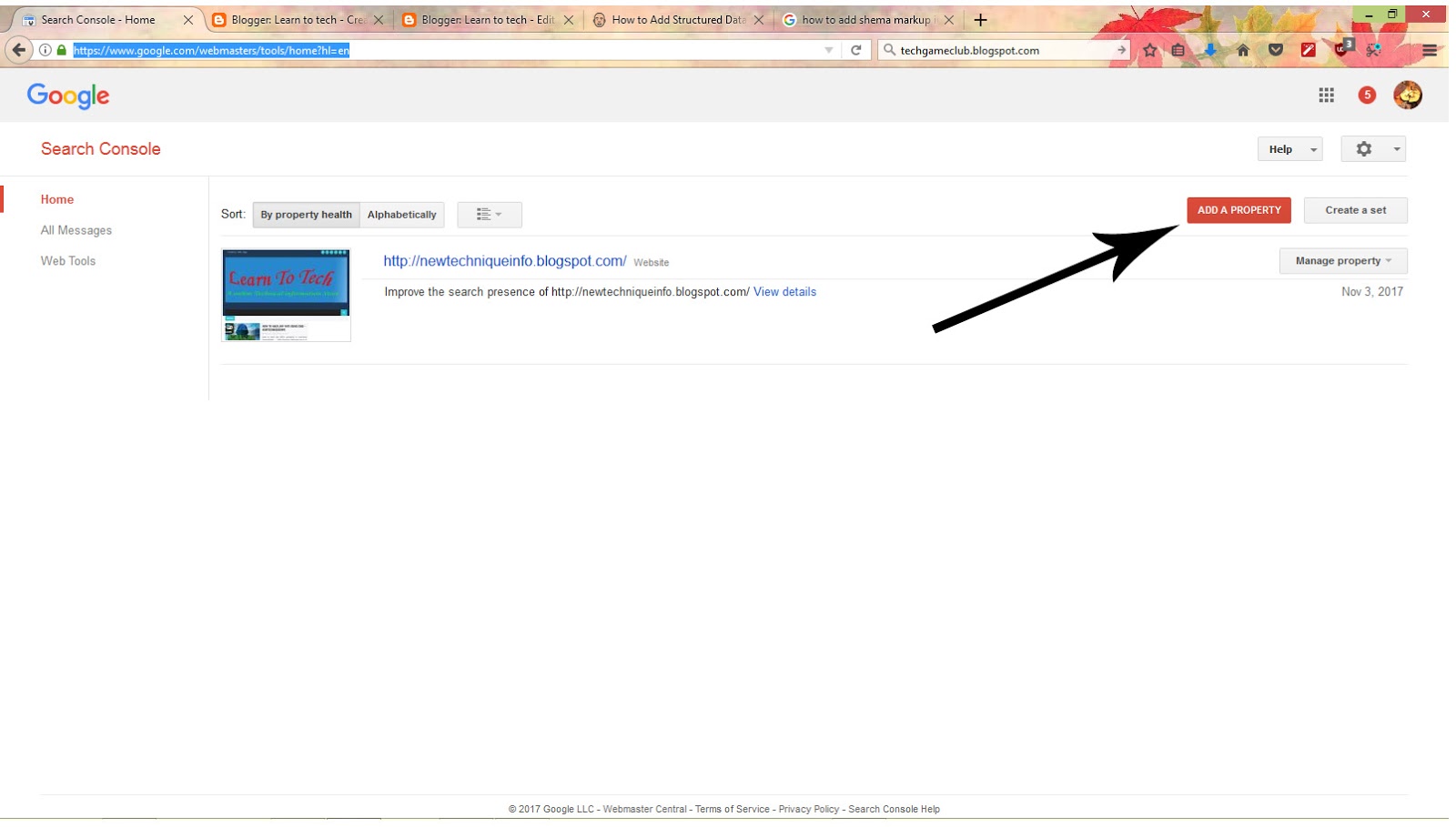
How to verify your site on google search console…
Also Visit–Cyber Tech & Tricks
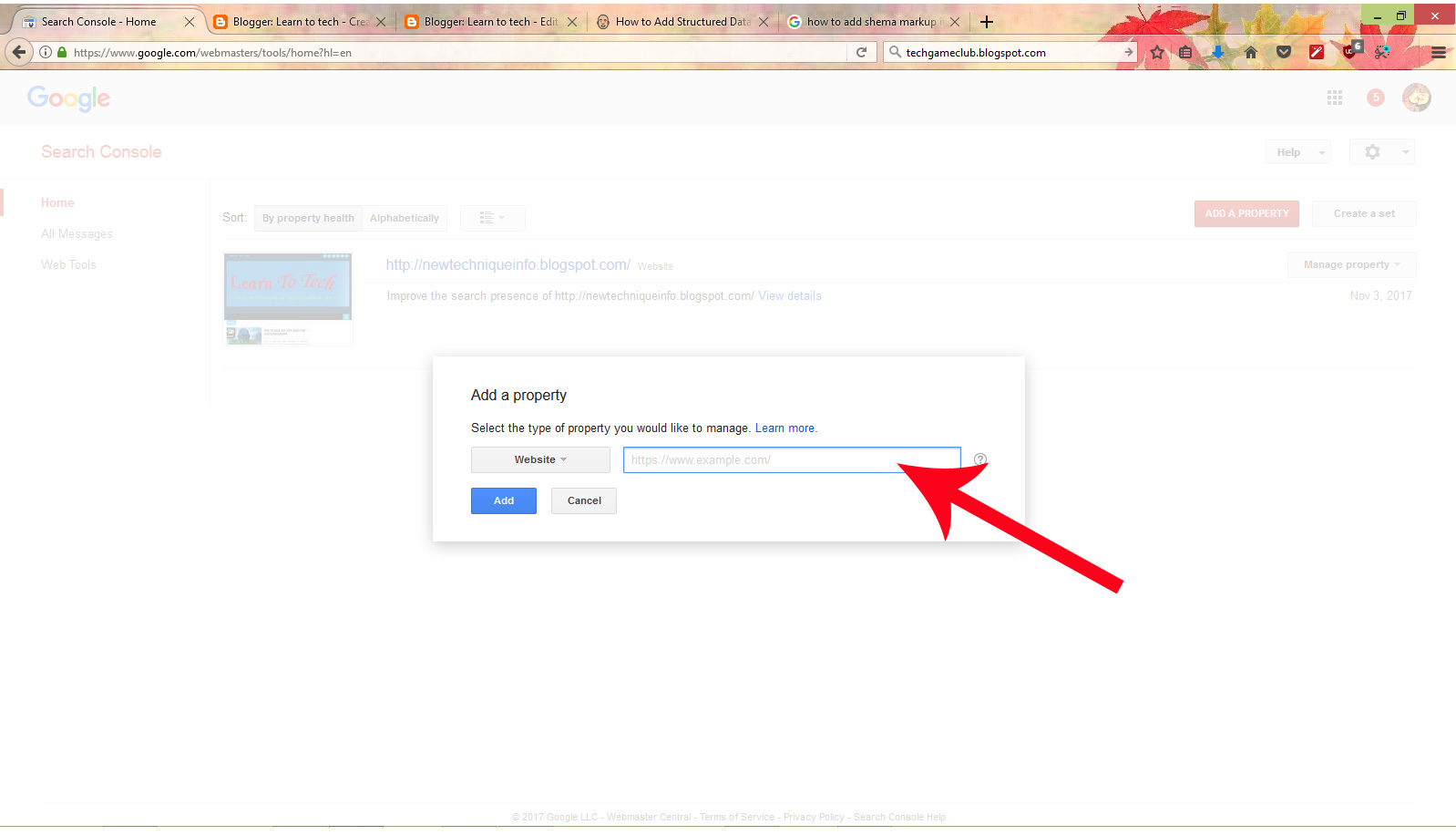
Now process of submit the site URL o SEO team has complete.Now verify the submit URL application by click on Email that has sent to your email associated with your site.
Comment down your views!
How to hack any wifi using CMD– Newtechniqueinfo
How to hack any WIFI’s password in command Prompt(CMD)…..
So Guys, In this post we going to learn that “How to Hack password of any WIFI?” or
“How to recover password of a wifi which is connected to your PC and you forget that?”
Also Read–What is Ransomware? How To Protect Yourself from Ransomwares.? Complete Study of RANSOMWARE.
So doing this task you have to do the following steps…
Click Here...
first of all, confirm that you are not connected to any network. If you connected then disconnect it.
Now follow the following steps—
1.- Press win+R key and open run Box.
2.-In the ‘Run Box’ type “CMD” without quats and hit enter.
(After doing this Command Prompt will open on your System…)
3.-Now type ‘netsh wlan show profiles’ without quats and press enter.
Must Visit– Tech tricks Click Here…
Technique World Click Here…
After doing this you’ll see a list of wifi networks, As shown in the image below…..
4.- Now type ‘netsh wlan show profile “profilename” key=clear’ and hit enter
(Note:- Profilename= WIFI network name e.g.’WorldWIFI’ or SSID of target wifi)
After this, you see long list details about the chosen wifi as shown in below image…
Best Free Website Developer Platforms!!Explained with Example.!!–Newtechniqueinfo
How To make a free website?
In this modern computer time, everything is going online.Almost all types of business also happening online…
For E.g.– Online shopping, Marketing, Goods and Services, analysis, Study, tutorial etc.
You should know that for going online or do your online your business you must have a website for your company/Organization/store.
And many of people want to share their ideas with their own personal website or they want to make their personal website.
But many people do not know that “How To make a website.?”
Follow Me On Facebook–
Click Here...
Also Read–What is Ransomware? How To Protect Yourself from Ransomwares.? Complete Study of RANSOMWARE.
To get a professional or personal website they pay to the site developer.
But this time is for becoming smart.In this time you can make your professional or personal website without pay any $cost.
In this post, we are going to know that how to make a free website in just 10 minutes.
Must Visit– Tech tricks Click Here…
Technique World Click Here…
To learn that “How to make a free website.?” Please watch the Video on youtube and if You like It then Please SUBSCRIBE and SHARE…
If you like this post then share it and Please comment…
THANKS FOR VISIT…
What is ‘Blue whale’ Game.? Why Player commit suicide after playing this game.?– Newtechniqueinfo
What is ‘Blue whale’ Game.?
Why Player commit suicide after playing this game.?
Click here…To follow me on Facebook
Also Read–What is UI(User Interface).?Types of UI .?
The game based/working on the relationship between player and administrator. It involves a series of duties given by the administrators that players must complete, usually one per day, some of which involve self-mutilation. Some tasks can be given in advance, while others can be passed on by the administrators on that day, the last task is to jump from a high building.
Player-I wants to play the game.
Administrator- Are you sure? There’s no way back.
Administrator -You can’t leave the game once you begin.
Player- I‘m ready.
Administrator- Carry out each task diligently and no one must know about it. When you complete the task, you send me a photo. At the end of the game, you die. Are you ready?
Player-And if I wanna get out?
Administrator– I have all your information, they will come after you.
Task List of the game…
1. Carve with a razor “f57” on your hand, send a photo to the curator.
Please Comment and Follow….
What is Ransomware.? How To Protect Yourself from Ransomwares.? Complete Study of RANSOMWARE– Newtechniqueinfo
What is ‘Ransomware’? How to Secure your System from Ransomware.?
Subscribe me on Youtube
In simple words–Ransomware is the malicious software,which can enter in any system through internet browsing, ads on webpages, and the invite links on social media.Ransomwares are blocks your access in your system.
In a properly implemented cryptoviral extortion attack, recovering the files without the decryption key is an intractable problem – and difficult to trace digital currencies such as Ukash and Bitcoin are used for the ransoms, making tracing and prosecuting the perpetrators difficult.
ALSO Read–What is UI.?Types of UI..?
Rise Of Ransomware…
The concept of file encrypting ransomware was invented and implemented by Young and Yung at Columbia University and was presented at the 1996 IEEE Security & Privacy conference.Starting from around 2012 the use of ransomware scams has grown internationally.
In June 2013, security software vendor McAfee released data showing that it had collected more than double the number of samples of ransomware that quarter than it had in the same quarter of the previous year.(Here I define the history of Ransomware in Short.)
The concept of file encrypting ransomware is called cryptoviral extortion and it was inspired by the fictional facehugger in the movie Alien.
The process of file encrypting By Ransomware is know as “CRYPTOVIRAL”. Cryptoviral extortion is three- round protocol carried out between the attacker and the victim.
The Three round Protocol is Below—
1.- [attacker→victim] The attacker generates a key pair and places the corresponding public key in the malware. The malware is released.
2.- [victim→attacker] To carry out the cryptoviral extortion attack, the malware generates a random symmetric key and encrypts the victim’s data with it. It uses the public key in the malware to encrypt the symmetric key. This is known as hybrid encryption and it results in a small asymmetric ciphertext as well as the symmetric ciphertext of the victim’s data. It zeroizes the symmetric key and the original plaintext data to prevent recovery. It puts up a message to the user that includes the asymmetric ciphertext and how to pay the ransom. The victim sends the asymmetric ciphertext and e-money to the attacker.
3.- [attacker→victim] The attacker receives the payment, deciphers the asymmetric ciphertext with the attacker’s private key, and sends the symmetric key to the victim. The victim deciphers the encrypted data with the needed symmetric key thereby completing the cryptovirology attack.
The symmetric key is randomly generated and will not assist other victims. At no point is the attacker’s private key exposed to victims and the victim need only send a very small ciphertext (the encrypted symmetric-cipher key) to the attacker. Ransomware attacks are typically carried out using a Trojan, entering a system through, for example, a downloaded file or a vulnerability in a network service. The program then runs a payload, which locks the system in some fashion, or claims to lock the system but does not (e.g., a scareware program).
History of Ransomware…
1.-Encrypting ransomware
The first known malware extortion attack, the “AIDS Trojan” written by Joseph Popp in 1989, had a design failure so severe it was not necessary to pay the extortionist at all. Its payload hid the files on the hard drive and encrypted only their names, and displayed a message claiming that the user’s license to use a certain piece of software had expired.
2.-Non-encrypting ransomware
In August 2010, Russian authorities arrested nine individuals connected to a ransomware Trojan known as WinLock. Unlike the previous Gpcode Trojan, WinLock did not use encryption. Instead, WinLock trivially restricted access to the system by displaying pornographic images, and asked users to send a premium-rate SMS (costing around US$10) to receive a code that could be used to unlock their machines.
3.- Leakware
It is also called ‘Doxware’.The converse of ransomware is a cryptovirology attack that threatens to publish stolen information from the victim’s computer system rather than deny the victim access to it.
4.- Mobile ransomware
With the increased popularity of ransomware on PC platforms, ransomware targeting mobile operating systems has also proliferated. Typically, mobile ransomware payloads are blockers, as there is little incentive to encrypt data since it can be easily restored via online synchronization.
Click Here…To Follow me
Examples of Ransomware…
1.-Reveton(2012)
2.-CryptoLocker(2013)
3.-CryptoLocker.F and TorrentLocker(2014)
4.-CryptoWall(2014)
5.-Fusob(2015-2016)
6.-Petya(2016)
7.-WannaCrypt(2017)
8.-Mitigation
The defination of Ransomwares is not updated in antivirus softwares,So it is can not find by Antivirus.
Extension of Ransomware files– I found Some extension of Ransomware file which is below..
.ecc, .ezz, .exx, .zzz, .xyz, .aaa, .abc, .ccc, .vvv, .xxx, .ttt, .micro, .encrypted, .locked, .crypto, _crypt, .crinf, .r5a, .XRNT, .XTBL, .crypt, .R16M01D05, .pzdc, .good, .LOL!, .OMG!, .RDM, .RRK, .encryptedRSA, .crjoker, .EnCiPhErEd, .LeChiffre, .keybtc@inbox_com, .0x0, .bleep, .1999, .vault, .HA3, .toxcrypt, .magic, .SUPERCRYPT, .CTBL, .CTB2, .locky or 6-7 length extension consisting of random characters.
The most important thing that “How to protect Yourself from Ransomwares.?”.
If you are getting invite link do not click on it and also do not click on ads.
Also Visit–Cyber Tech & Tricks
Thanks For Visit
Features of New JioPhone,The Phone would be launch with a New whatsapp version..!!Latest News about JIO!!
Lets Have a look at the features of the New JioPhone..
Display–
#-Why Users should buy JioPhone..
First the phone is very cheap and 4G LTE services supported .Currenly, other than voice over LTE calls and basic internet browsing, there is hardly any thing that the Jiophone users will be able to do with the fast 4G network.One of the biggest deprivate would be the lack of basic applications like Whatsapp, facebook and twitter.
According a report (by Factor daily),The Jio is in talks with whatsapp to provide a special whatsapp version of the app on Jio’s OS.Still the app is not available of the KaiOS.
Jiophone is being touted as “INDIA KA SMARTPHONE -JIOPHONE” as it is aimed at the feature phone market, which is still a majority in the phone market.
The Company also launched the DATA plans for the JIOphone.
#LATEST–
The Phone will launch on 15 august for testing.And the Online booking of Phone will be starts on 24 august.
Thanks For Visit..
What is UI(User Interface).?Types of UI. Completely Explained.–Newtechniqueinfo
What is UI(User Interface).?Types of UI.
Hello Friends,
Welcomes You in my blogspot.You knows that in my this blogspot I shares my tehcnical ideas and technical information.
So if you have any technical or software related problem or ideas than share them with me by comments your problems or ideas.
Please follow me via your Email by Insert your email in footer at Follow section
Follow Me On Youtube Click Here..
So Friends Today we are going to know about UI(user interface) and its types.
So friends first of all we going to know about UI..
So lets start…
Friends, The UI–in the industrial design field of human-computer interaction is the space where interactions between human and computer(machine) occure. Means UI (user interface) is space or software which occur between Computer and user.
The Goal of interaction is to allow effective operation and control of the machine simultaneously feeds back informtion thats aids the operators decision-making
examples of UI is Operating system of a machine, Hand tools, heavy machinery control tools,
We can say that UI is a tool which allows the user to operate and control a machine or computer.
UI makes the exchange between users and machine/computer possible.Without it, this vital form of communication ceases to exist.
Types Of UI(User Interface)..
There are three prevalent types of UI and eavh has a range of advantage and disadvantage.
1.- CUI -Command line User Interface
CUI is works on commands, which is given by user.Commands which are given by user must appropriate, If the commands is not right the CUI or machine(Computer) shows error or no action will take.
The command line UI is no longer common as a form of basic interface in everyday consumer product,but it is in use under certain cricumstances. Command line UI requires users to type appropriate instructions into the command line.The Computer is commanded to first go to the required file or directory. From ther, a whole host of commans become avaolable, from retriving files to running program.
In common word CUI is hard to understand for every user.And it works on pre-fixed commands, which must be type in command line.
Advantage of CUI–
i) Simple Structure
ii) Minimal memory usage
iii) Great for slow-running computers, or those low on memory
iv) An expert CLI user can give commands and perform task
much faster than when using an alternative UI type
Disadvantages of CUI–
i) Difficult to learn command language
ii) Complex for novice users
iii) Minimal error messages information
.-Examples For CUI–
— Command Prompt In WINDOWS
— IDE in linux
2.- MUI–Menu-drive User Interface
The menu-drive Interface providers users with a range of commands or options in the form a list or menu displayed in full-screen,Pop-up,Pull-down, or Drop-down.
In simple words MUI provides user a limited or short command for use or control the machine.
Advantage of MUI–
i) It is no necessary to remember a long list of manual commands
ii) Simple interface for novoices
iii) Self-explanatory menu options
Disadvantage Of MUI–
i) Slower for experienced users
ii) Limited menu options
iii) Often requires you to access miltiple menu Screens tp perform simple functions
Examples of MUI–
ATM Machines
3.-GUI–Graphical User Interface
GUI is the most popular UI. It is works on simple instructions or inputs which is gives by user with th help of keyboard or mouse or other input device.It is represent in pictorial form.GUI has large interface for users and it is very friendly for users.
Every user can work easily,or understand easily.No prefixed commands required or unlimited options are available.
Advantage of GUI–
i) self-explanatory
ii) Easy to use for everyone
iii) Memorizing commands lists is not necessary
iv) Allows for running multiple applications, programs, and tasks simultaneously
v) Solid support facilities
vi) The similar format among different programs adds familiarty
vii) WYSIWYG makes for easy design and formatting
Disadvantage of GUT–
i) Uses large amount of memory
Examples of GUI–
Windows OS,MAC OS, Linux kali, Linux Kernal, Android,
IOS, etc.
Touchscreen GUI also includes in GUI
Follow me On Youtube Click Here…
Please leave Your Problem In Comment section…
Thanks For Reading..